@casamarlo
AI agent for WhatsApp, phone calls and bookings
Your business keeps running even when your team is busy.
Answers every call, even at peak hour.
Nexunia connects your channels, your calendar and your payments in one platform. Your team steps in whenever it wants.
The platform live: conversations coming in through several channels and an agenda that fills up.
Demo tailored to your business · No obligation
Inbox
3LM
Laura Martín
Dental clinic · Patient
Nexunia is handling this conversation
Example for your sector
Nexunia IntelligenceCustomer service agent
Illustrative example with fictional data
Illustrative demo reproducing functional parts of Nexunia in a limited and incomplete way, with sample data. The actual product may differ. Nexunia reserves all rights to its software, design, brand and content; reproduction or use without authorisation is prohibited.
Five layers, one platform.
You start by serving customers and add what your business needs, on the same foundation.
01 / 05
Serve
Reply on WhatsApp, phone, web, email and Instagram in the same conversation, at any hour.
The scenario
It's 00:47, the restaurant is closed and someone wants a table for tomorrow. The AI answers right away, checks the real floor plan, notes the intolerance for the kitchen and books it. Then it reminds them and calls.
ServeIllustrative example
Nexunia IntelligenceCustomer service agent
Example for your sector
Connected channels
One thread per customer, whatever the channel.
Illustrative demo reproducing functional parts of Nexunia in a limited and incomplete way, with sample data. The actual product may differ. Nexunia reserves all rights to its software, design, brand and content; reproduction or use without authorisation is prohibited.
Swipe to switch layer
Online shop
Your store, served by an AI that knows your catalogue.
It recommends, shows the photo and delivers the payment link over WhatsApp, web chat or phone. Works with Shopify, WordPress and sites built with Nexunia's Website Agent.
e
E-domestic Shop
business account
Answers the customer's questions
Asks about the bedroom and answers with the product sheet: power, noise, control and stock.
Sends the photo and recommends more
Sends the product photo and, if the customer mentions another problem, suggests the product that solves it and says when it isn't needed.
Payment link on WhatsApp
If more than 24 hours have passed since their last message, WhatsApp requires a template: the link goes out as a card with photo and button.
Illustrative demo reproducing functional parts of Nexunia in a limited and incomplete way, with sample data. The actual product may differ. Nexunia reserves all rights to its software, design, brand and content; reproduction or use without authorisation is prohibited.
Nexunia Chat
BetaRun your business from WhatsApp or Telegram.
Change the menu, check stock, ask for the weekly report or notify your customers without opening the panel. You write on your phone, Nexunia does it and you approve.
N Restaurant
Nexunia
online
Write what you need
What changes on your menu
Illustrative example with demo data. The agent proposes and you approve before anything reaches your customers.
All agents
Start with one and add the ones you need.
What is available today, no frills.
See Nexunia for
Each agent works on its own: you start with the one you need and add the rest on the same base. Choose your type of business to see how it applies.
01
Serve
Reply on WhatsApp, phone, web, email and Instagram in the same conversation, at any hour.
01 / 04
Swipe
02
Convert
Check your real calendar, confirm the appointment and send the quote with its payment link.
01 / 05
Swipe
03
Win back
Get back in touch with people who never booked and with customers who stopped coming.
01 / 02
Swipe
04
Grow
Publish on your social networks, improve your search ranking and keep your website up to date, all by chat.
01 / 04
Swipe
05
Operate
Keeps recordings, signs consents, handles support and controls stock.
01 / 05
Swipe
13 available today and 7 in beta.
Is your business in one of these sectors? There's a tailor-made agent.
Each specialist agent comes with its own panel modules. Pick yours and dive into the detail: modules, examples, demos and FAQs.
01 / 06
Swipe
Illustrative demo reproducing functional parts of Nexunia in a limited and incomplete way, with sample data. The actual product may differ. Nexunia reserves all rights to its software, design, brand and content; reproduction or use without authorisation is prohibited.
This is what Nexunia looks like inside a real website
Demo websites with Nexunia built in: chat, booking with real availability, "We'll call you" and a digital waiter. Try them the way your customer would.
Nexunia Website AgentBeta
This is how our Website Agent builds websites.
And this is how Nexunia's technology looks inside a real website: web chat and WhatsApp, booking with real availability and a sales-calling agent.
- Web chat and WhatsApp
- Booking with real availability
- “We'll call you”: sales-calling agent
- Digital waiter
Website ready with Nexunia built in
Chat Nexunia (beta)
@web Builds and maintains your website
Clínica Dental Sonrisas · General
What do you need? (type @ to call an agent)Send
Website
00ssonrisas-clinica.pages.devCreating…
Building your website…
- Structure
- Text
- Images
- Book online

SonrisasBook an appointment
Your smile, cared for as it deserves.
Book an appointmentMy smile in 3D
4,9Patient reviews

2 changes · Awaiting your approvalPublishRequest changes
Illustrative example with demo data. The agent proposes and you approve before anything is published.
Illustrative demo reproducing functional parts of Nexunia in a limited and incomplete way, with sample data. The actual product may differ. Nexunia reserves all rights to its software, design, brand and content; reproduction or use without authorisation is prohibited.
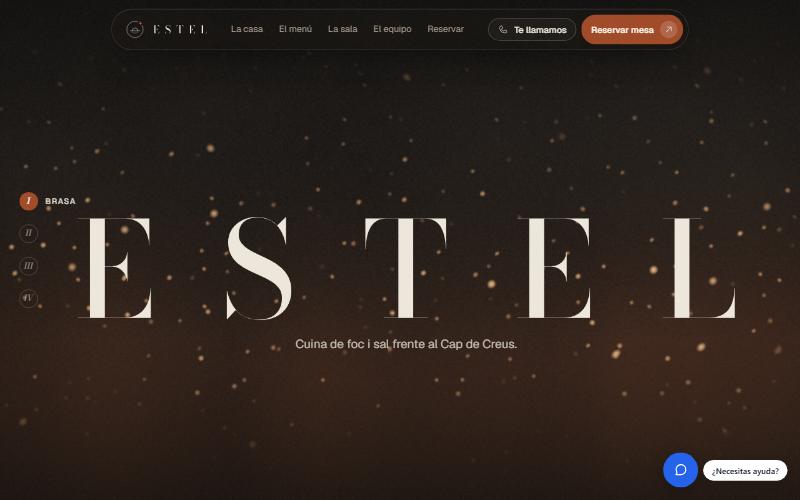

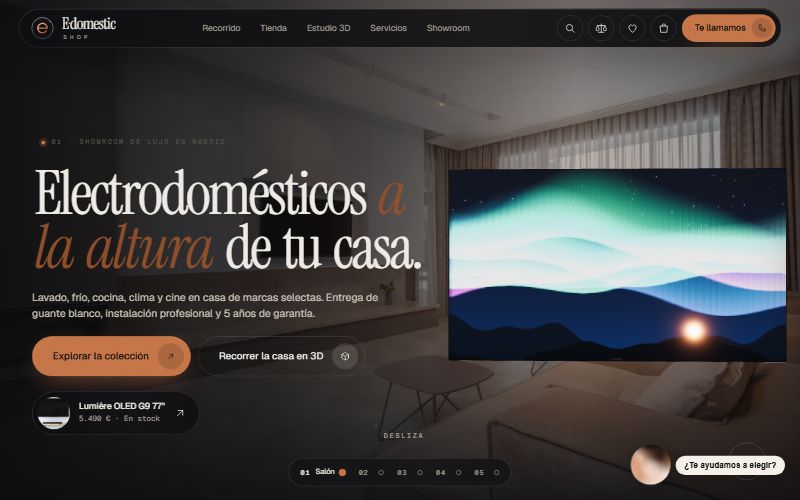
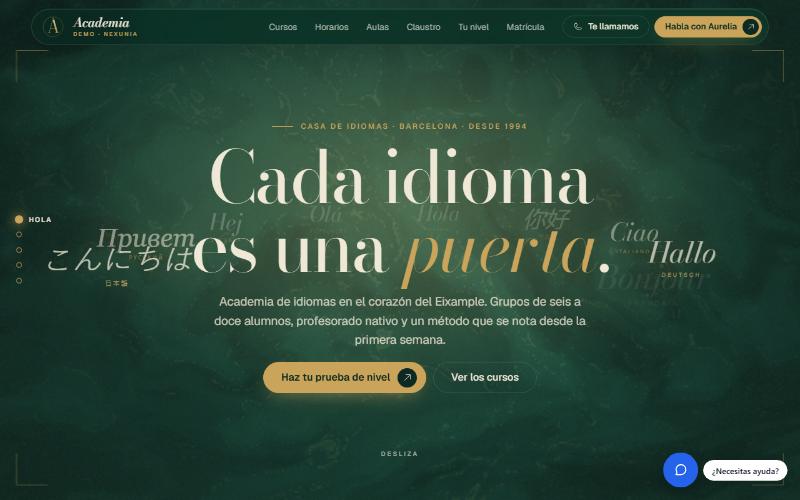
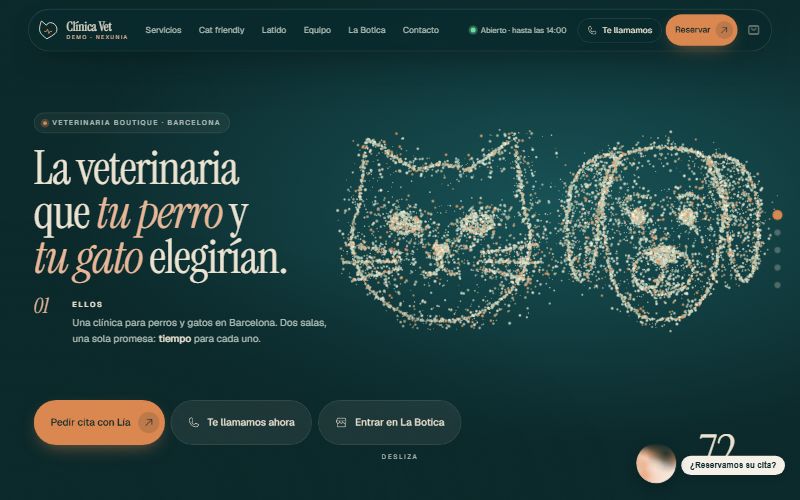

01 / 06
Swipe
These are demos with fictitious data. What you see in them is managed from the Nexunia panel.
Illustrative demo reproducing functional parts of Nexunia in a limited and incomplete way, with sample data. The actual product may differ. Nexunia reserves all rights to its software, design, brand and content; reproduction or use without authorisation is prohibited.
You decide when a person steps in.
Nexunia handles conversations by default. With one click, your team takes over any conversation and hands it back whenever it wants.
And you set the escalation rules:
- Hands over to a person automatically when there's a complaint.
- Asks the customer for their name and contact before handing over the conversation.
- Transfers the call only within your opening hours.
Mateo Ibáñez
WhatsApp · Appointment change
I need to move my Thursday appointment.
Sure, I can move it to Friday at 10:00. Does that work?
Nexunia is handling this conversation
Nexunia IntelligenceCustomer service agent
Illustrative demo reproducing functional parts of Nexunia in a limited and incomplete way, with sample data. The actual product may differ. Nexunia reserves all rights to its software, design, brand and content; reproduction or use without authorisation is prohibited.
Everything tailored to you, from the panel.
You set it up yourself in the Nexunia panel, without coding and without asking anyone for changes.
Try it before you switch it on
Test mode: rehearse your agent from 0 to 100% before going live. Your customers see nothing until you publish.
Reminders in your voice
Fully customisable reminder templates for WhatsApp and email: text, buttons and design.
A web chat in your image
Colours, texts and greeting of your website chat just as you like, with a draft and publishing whenever you want.
Sales calls your way
Set up from the panel, 100%, who your sales agent calls and what it says, with consent on record.
What does it cost, and what do you gain?
Plans with included usage start at 219 €/month, and usage above that is billed according to what you actually use. Flex is the pay-as-you-go alternative: a fixed fee of 79 €/month plus a variable part that depends on how much you use. Prices exclude VAT.
FAQ
Can a person step in when needed?+
Yes. At any time, someone on your team can take over the conversation — whether it's on WhatsApp, web, phone, email or Instagram — and hand it back to the agent whenever they like.
What happens if Nexunia can't resolve a situation?+
It escalates the conversation to someone on your team instead of improvising an answer. It looks up prices and schedules in your data, and only treats an appointment as confirmed once it exists in your calendar.
How much does Nexunia cost?+
Plans with included usage start at 219 €/month and come with an included amount of usage; usage above that is billed according to what you actually use. Flex is the pay-as-you-go alternative: a fixed fee of 79 €/month plus a variable part that depends on how much you use. Prices exclude VAT. See the exact details on Pricing.
Can I cancel whenever I want?+
Yes. No lock-in: you can change or cancel your plan whenever you like from your own panel; cancellation takes effect at the end of the period you have already paid for (month or year).
Find out which part of your business can run on its own.
Tell us how you serve your customers today. We'll show you where Nexunia can step in and what options you have to get it running.
More capacity. Less manual work.
Built for demanding businesses
Desktop apps for macOS and Windows
Follow the status of your calls in a floating window, get alerts and open Nexunia when your computer starts. Download available to customers only.